GEO Tools: Buy the Fix, Not Another Dashboard
Most generative engine optimization tools sell you a measurement. The measurement is real. It also tells you only what you already suspected: ChatGPT does not name you, and a competitor does. The tool worth paying for changes that answer, and that is a different product from the one that charts it.
This is a buyer's guide for people who already know what GEO is and want to stop collecting screenshots. Three parts: how to sort the tools, which questions expose the weak ones, and a 14-day test that costs you almost nothing.
Every GEO tool does one of three jobs, and most do only the first
Strip away the feature pages and you find three jobs.
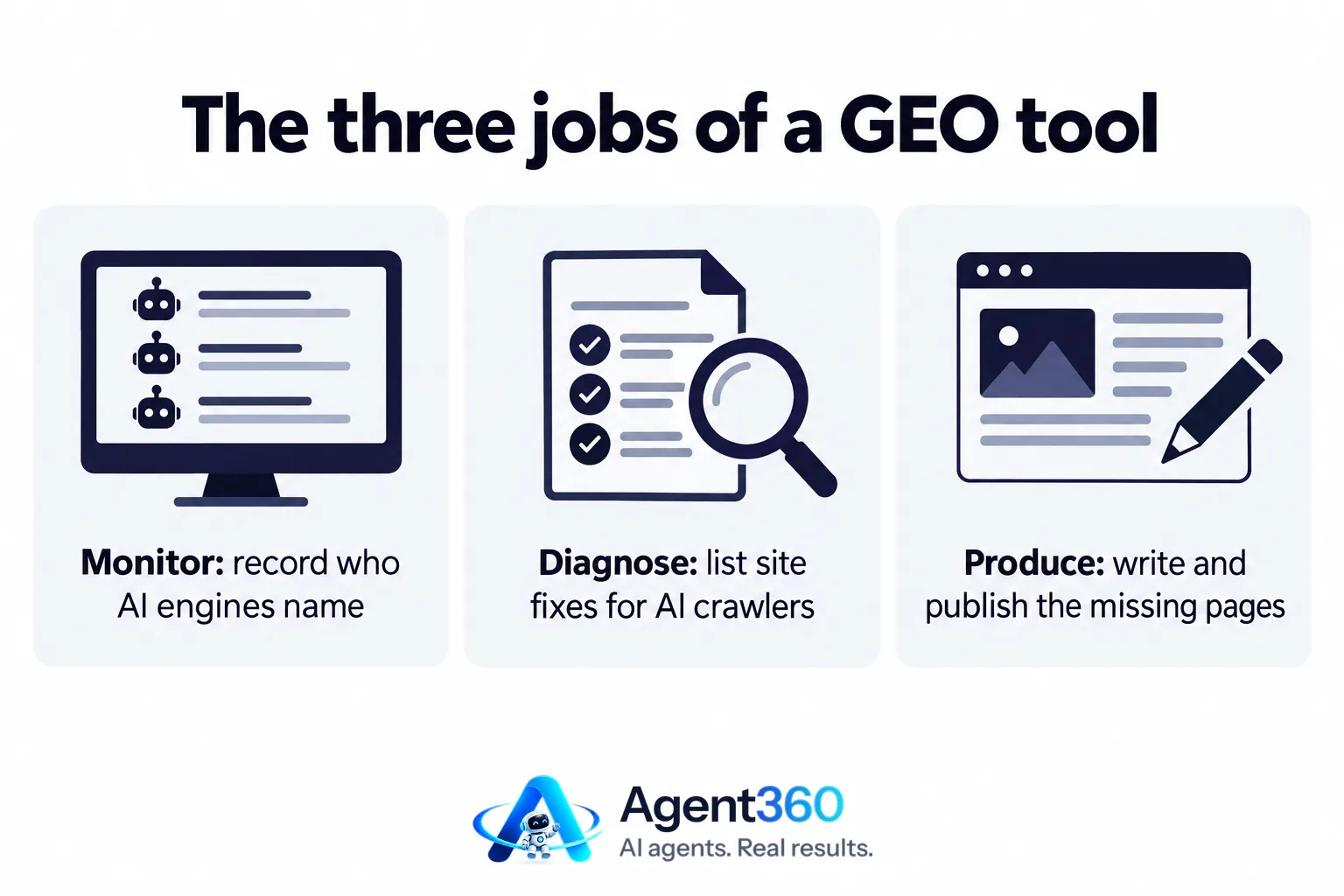
- Monitor. The tool asks AI engines a set of questions on a schedule and records whether your brand is named and which sites are cited. It is the most common category and the easiest to build.
- Diagnose. The tool inspects your site for the things AI crawlers and answer engines depend on: can crawlers reach your pages, are headings and structured data clean, does an llms.txt file exist. You get a list of fixes.
- Produce. The tool writes, publishes or refreshes the pages that answer the questions you are missing from. This is the job that actually moves a mention, because an AI engine can only name you for something your site says.
A monitor without production leaves you with a to-do list and nobody to do it. A producer without monitoring writes blind. A diagnostic scan helps once, then goes quiet when you have fixed the findings. Decide which of the three is your bottleneck before you look at pricing. Tools are priced for the job they do, so you will pay monitor prices for a monitor even if what you needed was a writer.
For a longer look at what the monitoring category tends to leave out, see AEO tools: what they track, and what they miss.
A single yes or no per question is not a measurement
AI answers vary from run to run. Ask the same question twice and the list of named brands can change. A tool that reports “mentioned: yes” from one run is reporting noise with a green tick on it.
Ask the vendor three things:
- How many times is each question run per check? You want repeated runs reported as a rate (named in some share of runs), not a single snapshot.
- Are the questions fixed between checks? If the prompt wording changes, you cannot compare this week to last week. A trend only means something on a stable question set.
- Does it show which sources were cited, not just who was named? The cited pages are your to-do list. A name with no source tells you that you lost and nothing about why.
Vague answers mean the tool is a demo. The reasoning behind a stable, repeatable method is laid out in how to track brand mentions in ChatGPT without fooling yourself. Use it as a checklist against any vendor.
Make the vendor name its engines, and name its gaps
“Tracks all major AI engines” is not an answer. Ask for the list. Each engine behaves differently. ChatGPT and Claude write recommendations from what they have learned and what they retrieve, while Google's AI Overview sits on top of a live search and leans on pages that already rank. A tool that treats them as one thing will average away the differences that tell you what to do.
Honest vendors also tell you what they do not cover. If a tool can't say which engines it skips, assume it skips some and keeps quiet about it. The engines your buyers use should be on the list. If your customers lean on one assistant you can't find in the tool, walk away, however good the interface looks.
Do not buy monitoring before you have pages to monitor
Here is the part many will disagree with. If your site has few or no pages that directly answer the questions a buyer would ask, a monitoring subscription will report that you are absent, week after week, and you will pay for the privilege. The absence is no mystery. The engines have nothing of yours to quote.

My rule of thumb, and it is a judgment rather than a law: until you have a real set of pages aimed at your top ten buyer questions, put the money into pages and read the results by hand once a week. Monitoring earns its fee once the pages exist and you need to know which ones are winning a mention and which are not. Before that, it is a thermometer pointed at a room with no heating.
The counterargument is fair. Monitoring first tells you which questions to write for. But a spreadsheet of ten questions, run by hand across the engines, gives you that for free. The next section shows how.
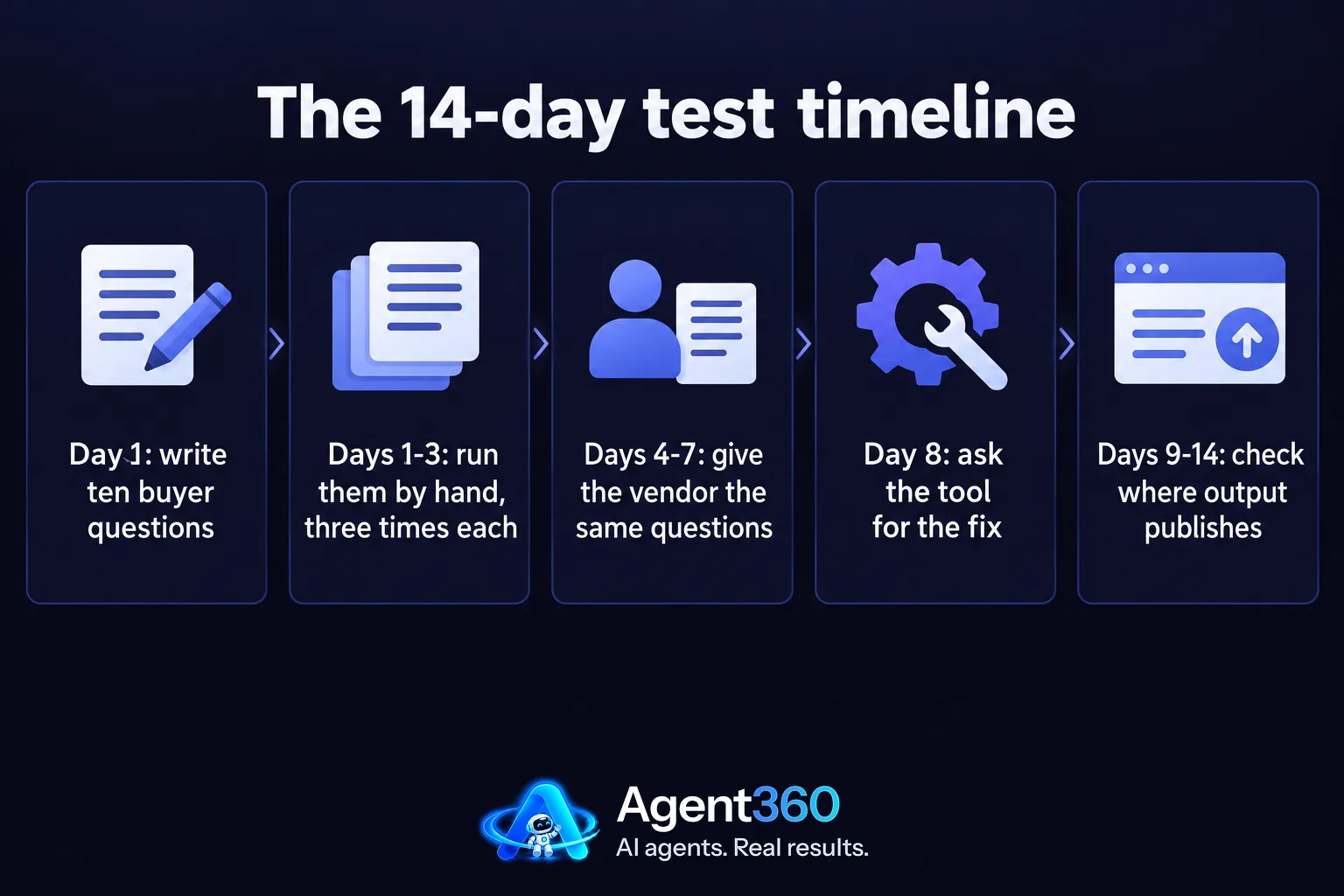
Run this 14-day test before you pay for anything
- Day 1: write ten questions in buyer language. Not keywords. Write the sentences a buyer would type to an assistant when asking for a shortlist, a comparison or a recommendation in your category.
- Days 1 to 3: run them by hand. Each question, in each engine you care about, three times. Record whether you are named, who is named instead, and which sites are cited. That is your baseline, and it costs nothing.
- Days 4 to 7: give the vendor the same ten questions. Compare their results with yours. If they disagree wildly on questions where you saw consistent answers, the tool's method is the problem.
- Day 8: ask for the fix. Pick the question where you are most clearly missing and ask what the tool recommends. A chart is a monitor. A specific page idea tied to that question is the start of production.
- Days 9 to 14: look at where the output goes. If the tool writes pages, where do they publish, who approves them, and can you edit them first? A tool that dumps drafts into a folder you then have to move by hand has shifted the work, not removed it.
Check the contract too. Month to month is a reasonable ask in a category this young. A vendor who wants a long commitment before you have seen a single result is telling you how confident they are in the result.
Where SearchAgent fits
SearchAgent does all three jobs. Its AI Visibility Agent asks your buyers' questions to ChatGPT, Claude and Google AI Overviews on a schedule, and shows who got named and which sites got cited. A site health score checks how readable your pages are to search engines and AI answers. Its writing agents then turn the misses into articles, published to a blog we host on your domain. By default every article is a draft for you to approve. It does not track Perplexity or Gemini, it does not build backlinks, and it does not publish into WordPress or Webflow. Plans start at $297 a month with no contract; the details are on the pricing page. If you are weighing it against a research suite, the Ahrefs comparison shows where each one fits.
Questions buyers still ask
What are generative engine optimization tools?
They are software that helps your business get named and cited in answers written by AI assistants such as ChatGPT, Claude and Google's AI Overviews. They fall into three jobs: monitoring whether you are named, diagnosing site problems that block AI engines, and producing the pages that give those engines something to quote.
Can a GEO tool guarantee that ChatGPT will mention my brand?
No. Nobody controls what an AI engine writes. A good tool can show you whether you are named, which sources are cited and which pages would close the gap. Treat any guarantee of mentions as a reason to distrust the vendor.
Do I need a separate GEO tool if I already have an SEO suite?
Often, yes. Most classic SEO suites track Google rankings and links, not whether an AI answer names you. The pages that win in both places overlap heavily, so you rarely need two content strategies. You do need a way to see the AI answers your ranking data can't show.
More articles
- Set Posts Per Week From Your Gap List, Not a Calendar
- SEO Reporting for Small Business: One Page, Five Numbers
- AI Overview Search Visibility: Check It, Then Fix It
- How to Appear in AI Overviews (and Why You Can't Opt In)
- How to Get Your Firm Featured in Google's AI Overviews
- Keyword Cannibalization at Enterprise Scale: The Real Fix
- How to Get Into Google's AI Overview, Really
- Hur du rankar i ChatGPT (och vad det egentligen betyder)
