How to Turn Leads From LinkedIn Comments Into Meetings
Leads from LinkedIn comments are the people who engage with a post before you ever reach out to them, which makes them warmer than a cold list. Someone who comments on a post about hiring, budgets, or a product category has already told you what they care about. That one data point beats a title and company size match on a prospecting list, because it is a real signal, not a guess.
The hard part is not spotting these people. It is building a process to capture them, check whether they fit your market, and reach out before the moment passes.
Key Takeaways
- Treat commenters as a warm signal, not a finished lead; you still need to check fit before you message them.
- Export commenter names and job titles manually or with a browser tool, since LinkedIn does not offer a native export button for this.
- Message within a few days of the comment while the context is still fresh, referencing the post topic, not the comment itself word for word.
- Combine comment activity with other buying signals so you are not relying on one post as your entire pipeline source.
- Route qualified commenters into a short outreach sequence instead of a generic cold cadence.
Table of Contents
What counts as a lead from LinkedIn comments?
A lead from LinkedIn comments is anyone who replied to a post on a topic connected to your product, service, or role you're filling. This includes comments on your own company posts, on a competitor's posts, on an industry influencer's post, or on a trending topic post in your niche. The comment itself does not need to mention your product. A hiring manager commenting on a post about remote team burnout is still a signal if you sell a tool that helps with team capacity.
Does a like count the same as a comment?
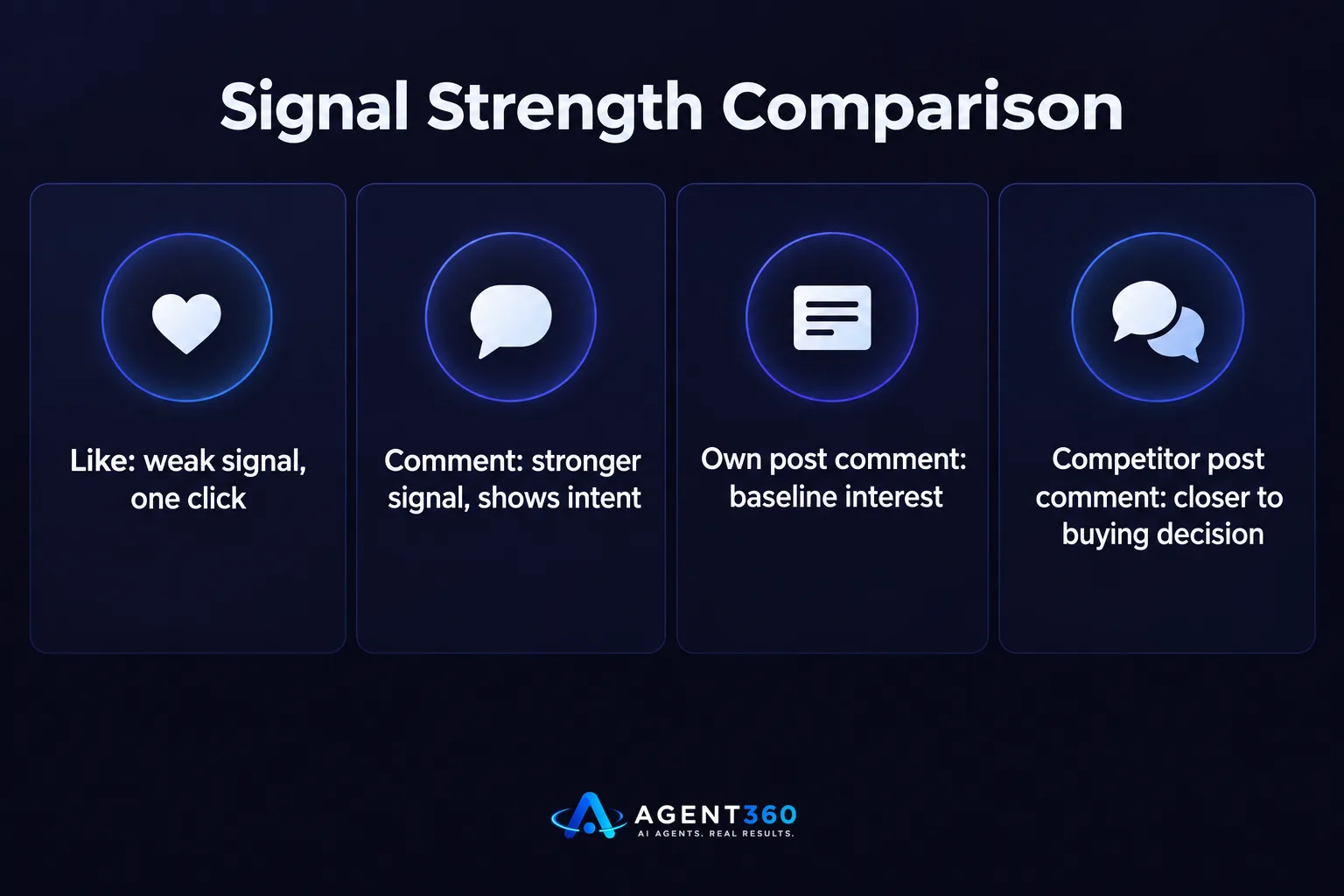
No. A like is a weaker signal because it takes one click and no thought. A comment means the person stopped, read, and wrote something, which shows more attention and often more intent. Treat likes as a secondary list to check, not your primary source.
Do commenters on competitor posts count?
Yes, and they are often more useful than commenters on your own posts. Someone engaging with a competitor's content is already evaluating the category you sell into, which puts them closer to a buying decision than someone who has never shown interest anywhere.
How do you find and export commenters?
You find them by checking the comment section of relevant posts, then capturing names, titles, and companies into a list you can work from. LinkedIn does not provide a built-in export button for comments, so most teams do this by hand for a handful of posts or use a browser-based tool built for this exact task.
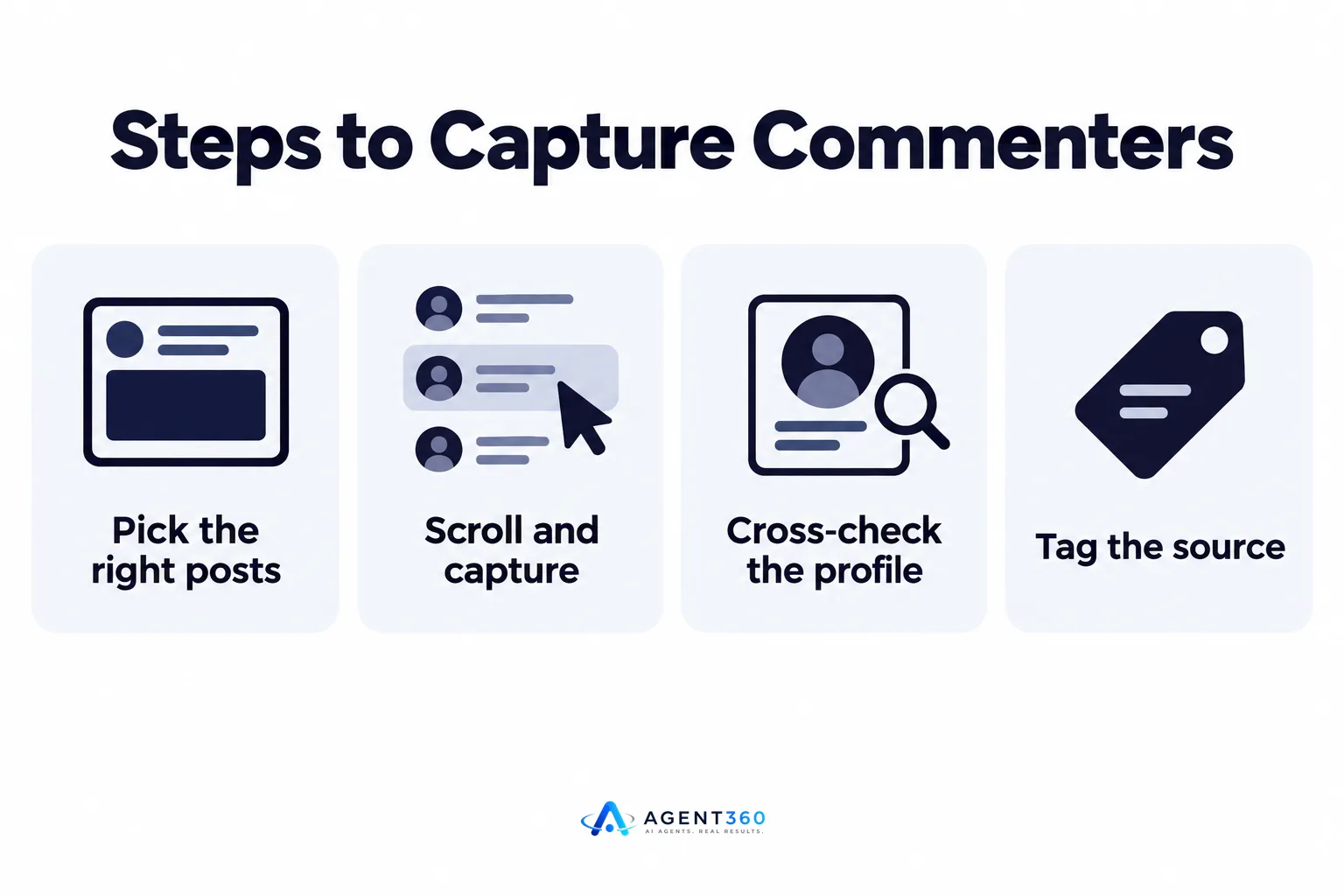
- Pick the right posts. Choose posts from your own page, a competitor's page, or an industry account where the topic lines up with what you sell.
- Scroll and capture. Open the comment section and note name, title, and company for each commenter who looks relevant.
- Cross-check the profile. Visit each profile briefly to confirm the title and company match your target buyer before adding them to your list.
- Tag the source. Mark each lead with the post it came from so your messaging can reference the right context later.
Whatever method you use, stay inside LinkedIn's own rules on automated data collection, which the platform spells out in its User Agreement. Heavy automated scraping of comments risks the same account restrictions as aggressive connection requests, a pattern covered in more detail in LinkedIn outreach limits.
Should you export comments with automation tools?
Light, manual-style capture is lower risk than running an automated scraper against comment threads at scale. If you want volume, look for a tool that pulls public comment data at a human pace rather than one that hits LinkedIn's servers with rapid automated requests, since the latter is what tends to trigger account flags.
How do you qualify commenters before reaching out?
You qualify them the same way you qualify any lead: check title, company size, and industry against your ideal customer profile before you send a single message. A comment is interest, not fit. Someone outside your target market who comments on your post is still not worth a message, no matter how engaged they seem.
What if the commenter is the wrong title?
Check who else at that company might be the right contact, and treat the comment as a reason to research the account, not necessarily to message that specific person. The comment tells you the company is paying attention to the topic, which is useful even if the individual isn't your buyer.
What's the best way to message someone who commented?
Reference the topic of the post, not the comment word for word, and keep the message short. Quoting someone's exact comment back to them can feel like surveillance. Referencing the topic they engaged with feels like a natural follow-up to a conversation they were already part of.
How soon after the comment should you reach out?
Within a few days, while the post and topic are still fresh in their mind. Waiting weeks means you have to re-explain the context, which erases most of the advantage of starting from a warm signal in the first place.
What channel works best for this kind of outreach?
A LinkedIn message or connection note tends to fit this motion better than cold email, since the person is already active on the platform and the context carries over naturally. If the first touch doesn't land, a short follow-up on a second channel can help, which is the same multi-channel logic covered in multi-channel outreach.
How do you turn this into a repeatable pipeline motion?
You build a weekly habit: check a short list of relevant posts, capture and qualify commenters, then run them through a short outreach sequence. One post's comment section is not a pipeline strategy on its own. It becomes one, alongside other signals, when you repeat it consistently and combine it with other sources, the way job postings and hiring signals already work as one input among several, as described in job postings as a buying signal.
Should comments replace your other prospecting sources?
No. Comments are one input among several. Pairing comment-based leads with firmographic and intent signals gives you a fuller picture than any single source, which is the logic behind buying signals that go beyond job boards.
Put This Signal to Work Without the Manual Grind
Finding leads from LinkedIn comments works, but doing it by hand every week takes time most founders and small sales teams don't have. Agent360's AI prospecting finds buyers showing interest signals across your target market, and its multi-channel outreach engages them across LinkedIn, email, and phone once they're qualified, so a comment doesn't just sit in a spreadsheet.

The CRM tools built into Agent360 also track where each lead came from, so a commenter you reach out to today doesn't get lost in a pipeline stage next month.
See how the signal-to-meeting process works end to end on the AI prospecting page.
Frequently Asked Questions
Is it legal to collect names from LinkedIn comments?
Public comments are visible to anyone viewing the post, but how you collect and use that data should stay within LinkedIn's own User Agreement, particularly around automated scraping at scale. Manual, low-volume capture carries far less risk than automated tools hitting the platform repeatedly.
How many comments should I check per week?
There's no official number from LinkedIn, so the right amount depends on how many relevant posts appear in your industry each week and how much time your team can spend qualifying. A short, consistent list checked weekly beats a large one-time sweep that never gets repeated.
Do I need a tool to export LinkedIn comments?
Not for small volumes; manual review works fine for a handful of posts a week. A tool helps once you're checking many posts regularly, but it should operate at a pace that doesn't resemble automated scraping.
What if someone comments but never replies to my message?
Treat it like any other outreach attempt: a short follow-up sequence, then move on. The comment made them warmer than a cold contact, but it doesn't guarantee a reply.
Can this work for staffing and recruiting firms, not just sales teams?
Yes. A hiring manager commenting on a post about team growth or hiring challenges is a signal worth checking, the same way job postings are, as covered in job postings as a buying signal.
More articles
- How to Export LinkedIn Post Likers for Warm Outbound Leads
- HeyReach vs Waalaxy: Which LinkedIn Tool Fits B2B Outbound?
- Multiple LinkedIn Accounts for Outreach: Help or Ban Risk?
- Is LinkedIn Automation Safe? What B2B Teams Should Know
- Scale LinkedIn Outreach Safely – Avoid Bans and Boost Meetings
- Over-Automating LinkedIn Kills Your Pipeline – Here's Proof
- How Fast to Reply to Sales Leads: The 48-Hour Rule
- AI Buying Signals Beat Job Boards for Warm Leads
